To celebrate its 30th Anniversary, a new modification for original Quake has been added for free to the Steam version: «Dawn of the Machine» from MachineGames.
Let’s look at how to play it natively on Mac.
So far I spent more time figuring out how to get the Dawn of the Machine extension running natively with Mac Quake, than my first play session time. Let me spare you from this journey!
Here’s how to play Quake Dawn of the Machine (DOTM) on macOS
The requirements are: download the Quake Steam version to macOS, add a Mac Quake game app to it, and add a localisation file into the right place.
Ultimately, we want the following Quake folder structure:
/quake # <- Steam Quake installation
├── _CommonRedist
├── build.vdf
├── …
├── id1/
│   ├── PAK0.PAK
│   ├── PAK1.PAK
│   └── …
├── …
├── rerelease/
│   ├── …
│   ├── localization/
│   │   └── loc_english.txt # <- Localizations
│   ├── mg3/ # <- Dawn of the Machine
├── …
├── quake.exe
├── QuakeSpasm.app # <- Mac Quake app
├── …
Download the newest Quake game version from Steam
DOTM was already added to the Steam Quake 1 version through a recent update; so when the Steam Quake game files are downloaded or updated, the DOTM expansion is automatically available through an expansion folder named «
mg3».Because Quake on Steam is only published as a Windows game, we’ll use this neat workaround to download any Steam games to macOS: via the steamcmd Command-Line app.
Pre-requisite: install steamcmd on macOS using homebrew – if you haven’t yet
- Make sure that homebrew is installed.
- Open the «
Terminal.app» and run this command:brew install --cask steamcmd
- Now type this in the Terminal window, to run it for the very first time:
steamcmd
- macOS Gatekeeper will complain & the steamcmd CLI will crash. Don’t worry!
- Go to the macOS «System Settings» & navigate to Privacy & Security » Security section (in the very bottom).
- Click on the «Allow anyway» next to the App entry «
Breakpad.framework»
Download Steam Quake version to your Mac using steamcmd
This should be clear… You have to have purchased / obtained «Quake» on Steam, so it’s part of your Steam Library already.
Before running below command, note that the following values must be adjusted:
steamUSER→ the Steam username to log-in withsteamPASSWORD→ the password to log-in/path/to/install/quake→ the full path to where the Steam Game should be installed to.
Using now the steamcmd CLI app, the download on macOS can be achieved using the following command in «Terminal.app»:
steamcmd +@sSteamCmdForcePlatformType windows \
+force_install_dir "/path/to/install/quake" \
+login steamUSER steamPASSWORD \
+app_update 2310 validate
IMPORTANT: the Order of commands matters!
If you have 2-factor / SteamGuard enabled, you will be asked to enter the 2FA-Code into the Terminal window at some point.
Once the command ran successfully, you should have the whole Quake game extracted at the folder path you specified!
Add the Mac-version of QuakeSpasm to the Steam Quake folder
Next, a macOS-native Quake game app is needed – I went with QuakeSpasm:
- Open the Quake game webpage on Mac Source Ports.
- From that page, download the «
QuakeSpasm» Mac App.
- Extract the downloaded image & move the «QuakeSpasm.app» into the previously installed Steam Quake folder
(at"/path/to/install/quake"). It must be right alongside the/id1folder.
Obtain and configure additional files for Dawn of the Machine
Rereleased Steam Quake version added a new localization feature, used by DOTM for localizable text strings.
To make this work: a correctly named text-file in a localization folder is needed, so it’s properly picked up by QuakeSpasm (and other Mac Quake apps) – and its location on macOS is different to Windows, as I happened to find out.
- Download the file
loc_english.txtfile from my Gist here:
https://gist.github.com/Swiss-Mac-User/949ef7186a30c4d09c22af0dbe3cdbc2
- Open the Steam Quake folder, and then inside the
/rereleasefolder. - Here, create a new folder named «
localization» - Place the
loc_english.txtfile inside the new/rerelease/localizationfolder.
🕹️ Finally: Play time!
The steps to launch «Dawn of the machine» (mg3) are now rather simple:
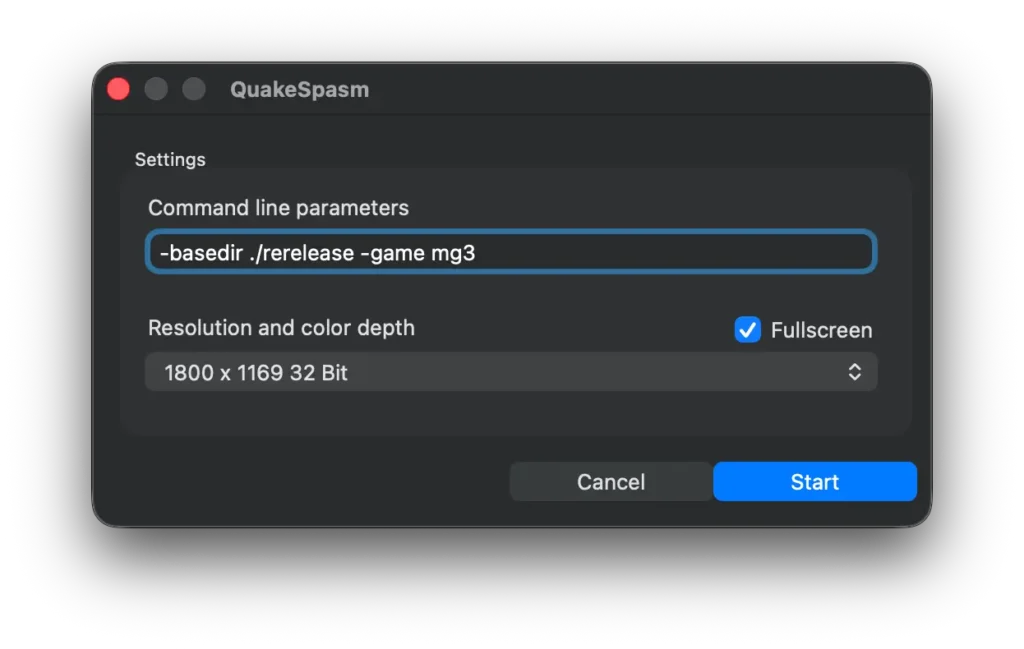
Launch QuakeSpasm.app and copy-paste the following «Command Line Parameters»:
-basedir ./rerelease -game mg3
NOTE: if you want to have a more proper setup, sparing you from using these CLPs going forward, see the additional remarks further below in this article.
In Quake, start a «New Game» and you’ll teleport into «Dawn of the machine»!
P.s. don’t be confused from the default Quake Demo playing – the game context will be correct on the DOTM expansion.
Note on other Mac Quake Apps and ways to play the Quake Steam-version
Enable QuakeSpasm «Mods» selection, making Command Line Parameters obsolete
If you are annoyed at (re-)using the «Command Line Parameters» with QuakeSpasm to play Dawn of the Machine, you need the following changes within the downloaded Quake Steam folder:
- Copy the 2 folders
/rerelease/mg3/and/rerelease/localization/directly up into the root Quake folder, alongside/id1andQuakeSpasm.app - Now you can just launch QuakeSpasm without CLPs, and then use the in-game menu «Mods» and select «mg3» to switch the game into the Dawn of the Machine expansion.
Quake Steam version using CrossOver for Mac
This would be of course the easiest to play Quake’s «Dawn of the Machine» on Mac. But it requires to also purchase, aside of the Quake game, the CrossOver App itself – or use it for a limited 14 days free trial.
Mac vkQuake
As of the time of writing, Mac vkQuake does not support the new Monster Models of DOTM, but it can run the Mod nevertheless when launching it using a few special parameters (i.e. not loading new Models):
- Open Terminal.app and
cdinto the vkQuake Mac App Bundlecd /path/to/vkQuake.app/Content/MacOS/
- Then launch the
vkquakebinary with additional command line parameters:
vkquake rerelease-2026 +r_enhancedmodels 0 +r_allow_replacement_md5models 0 -game mg3 -basedir /full/path/to/quake/rerelease/Mac DarkPlaces
I didn’t test this one per the time of writing.
UPDATE: DarkPlaces does not yet support Quake Rerelease (Steam version) – it crashes with a «Server disconnect» after a short play time in-game. Due to this, and lack of new Localization support, it’s not really an option to play «Dawn of the Machine» as per the time of writing.
Sources used
Kudos to the following posts and articles.
- r/quake «Q30 Update Crash Fixes»
- r/quake «Quake Mission Pack No. 4 – popup text doesn’t load properly»
- r/quake «How do i add mods to quake?»
- r/quake «How to run quake mods and maps»
- sezero/quakespasm: «Dimension of the Machine Horde mode: broken strings»
- sezero/quakespasm: «[Feature] Search for localization file in engine folder»
- sezero/quakespasm: «Check for QuakeEx.kpf in gamedir if not found in basedir – #81»
- DoomWorld Discussion: «Issues with QuakeEX.kpf in QSS»
- Steam Quake Discussion «BAND AID FIX FOR QUAKE REMASTER NOT LAUNCHING»
- Steam Quake Discussion: «Dimensions of the Machine Text Glitches In Quakespasm Spiked?»
- Steam Forums – Steam for Mac «Error: Failed to load steamui.dylib (NOW FIXED)»
- Novum/vkQuake «Support for new Quake re-release string handling.»
- boggydigital/mac-gaming-guides «How to get game data from Steam»